
How VanCAD compares
VanCAD vs the alternatives
Most camper van design tools stop at arranging furniture in a box. VanCAD is free, runs in any modern browser, and does more - a live bill of materials with cost and weight, wiring and plumbing routing, item groups, and multiple saved states per item.
The best comparison is trying it - the full toolkit is free, right in your browser.
Feature by feature
How they compare, side by side
Like-for-like features. vanspace 3D claims are verified against the live product and dated so you can check them yourself.
Comparison verified August 2026
| Feature | vanspace 3D | VanCAD |
|---|---|---|
| App type | vanspace 3D Not supportedDesktop app - installed on Windows or Mac | VanCAD SupportedRuns in any modern web browser - nothing to install |
| Free to use | vanspace 3D Not supportedPaid app - no free version | VanCAD SupportedThe full design suite is free on a free account - subscribe only to save your work to the cloud |
| Cloud saving | vanspace 3D Not supportedNo cloud saving | VanCAD SupportedSave unlimited designs to the cloud with Pro - open them on any device |
| Component catalogue | vanspace 3D SupportedLarge prebuilt catalogue of parts | VanCAD SupportedLarge prebuilt catalogue, and still growing |
| Custom objects | vanspace 3D LimitedBasic primitive shapes; no dedicated object editor | VanCAD SupportedA full Custom Object Generator - combine and boolean-cut primitives into any part you can imagine |
| Wiring & plumbing | vanspace 3D Not supportedNot supported | VanCAD SupportedDesign your wiring and plumbing routes through the van's wall cavity, in 3D |
| Bill of materials | vanspace 3D Not supportedNot supported | VanCAD SupportedA live bill of materials that tracks your build's running cost and added weight as you design |
| Guided tutorials | vanspace 3D LimitedVideo walkthroughs, followed along outside the app | VanCAD SupportedInteractive tutorials built right into the app that teach you as you design |
| Item groups | vanspace 3D Not supportedNot supported | VanCAD SupportedGroup multiple items into a kit and move, rotate and resize them as one |
| Item states | vanspace 3D Not supportedNot supported | VanCAD SupportedSave multiple states per item - awning stowed or deployed, seats driving or swivelled, bed folded or made up |
Where VanCAD pulls ahead
Three differences that matter on a real build
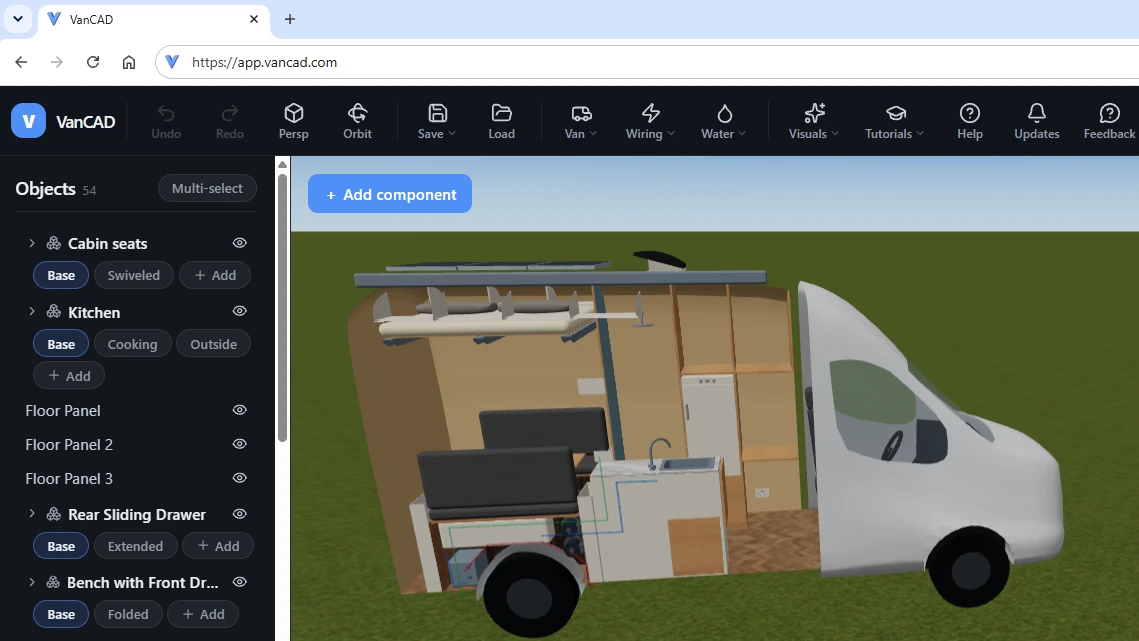
Free, and in your browser
Nothing to install, nothing to buy to start
No download, no licence, no paid software to install. VanCAD opens in the browser you already have - on any operating system - and the whole design toolkit is free to use. You only pay if you want to save your designs to the cloud.
- Works on Windows, Mac, Linux and Chromebooks - anything with a modern browser
- No download, no licence, no high-end graphics card
- Design for free; subscribe only to keep and sync your work
Practical outputs
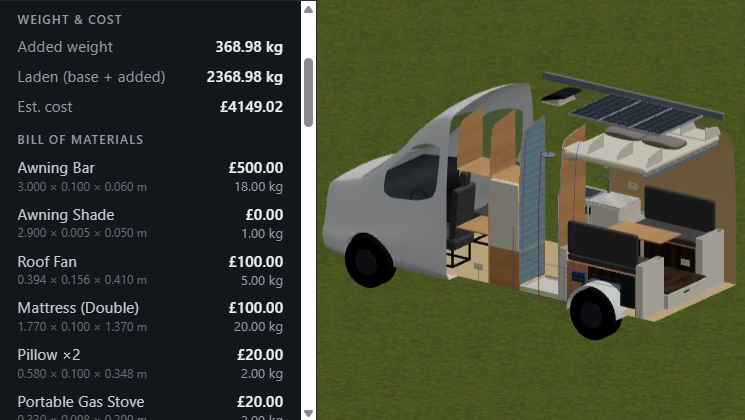
Your build sheet writes itself
This is the part most planners skip. As you place parts, VanCAD keeps a live bill of materials, a running cost, and a total added weight - so you know it will fit, what it will weigh against your van's payload, and what it will cost before you buy a single board.
- Live bill of materials as you design - fully configurable to the actual parts you're planning on using
- Running cost total
- Total added weight - checked against your van's payload
The whole van
Design the systems, not just the furniture
A real conversion is more than boxes on a floor. VanCAD routes the wiring and plumbing through the wall cavity where they actually go, groups items into kits that move as one, and saves multiple states per item - so one design can show the bed both folded and made up.
- Wiring & plumbing routed through the real wall cavity
- Groups: bundle items into kits and transform them together
- States: awning stowed/deployed, bed folded/made, seats driving/swivelled
Common questions
VanCAD, answered
Is VanCAD really free?
Yes - the full 3D design toolkit is free to use in your browser: every van, every component, and every output. All it takes is a free account, and you can browse the demo builds without even that. Free sessions are time-limited; a VanCAD Pro subscription adds saving and cloud sync so your designs persist across your devices.
Do I need to install anything?
No. VanCAD runs entirely in a modern web browser - no download, no plugin, no licence, and no high-end graphics card. That also means it works on Windows, Mac, Linux and Chromebooks alike.
What can I do in VanCAD that other planners don't offer?
VanCAD adds the things a real build needs: a live bill of materials with running cost and added weight, wiring and plumbing routing through the wall cavity, item groups that move and resize as one, multiple saved states per item (a bed shown folded or made up, an awning stowed or deployed), and a custom-object builder for parts that aren't in the catalogue.
Does VanCAD produce a bill of materials with cost and weight?
Yes. As you place parts, VanCAD keeps a live bill of materials with a running cost total and total added weight, so you can check the build against your van's payload before buying anything.
Can I design on a Mac, Linux or Chromebook?
Yes - because VanCAD runs in the browser, it works on any modern operating system, including Mac, Linux and Chromebooks. The 3D view uses WebGL, which current versions of Chrome, Edge, Firefox and Safari all support.
Which vans can I design?
Most major vans are already included, and the list is always growing. Check out the app's van picker to see all the available models, get notified about van model additions, and request a specific van if you don't see the one you're looking for.
Comparison information is provided in good faith and reflects our understanding of both products as of August 2026. vanspace 3D is a trademark of its respective owner; VanCAD is an independent product and is not affiliated with, endorsed by, or connected to vanspace 3D. Software changes over time - please verify current vanspace 3D features on their official website before you decide. Found something out of date? Tell us at hello@vancad.com.
See the difference for yourself
The full VanCAD design toolkit is free, right in your browser - no install, just a free account.