
Subscription
One control in the account menu changes with your subscription: it reads Upgrade to VanCAD Pro until you have one and Manage subscription afterwards. Both hand you to Stripe, which takes the payment and holds the card details - VanCAD never sees them.
Upgrade to VanCAD Pro
Section titled “Upgrade to VanCAD Pro”What it is. The primary button at the top of the account menu, shown while you are on the free tier.
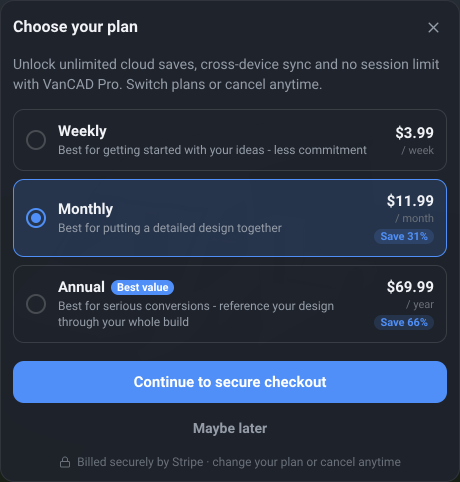
What it does. Opens Choose your plan, and from there hands you to Stripe’s checkout page.
Options and limits. There are three billing intervals - weekly, monthly and annual - and they buy exactly the same thing. Only the cadence and the price differ, so choose on how long you expect your build to take rather than on what you get. Monthly is pre-selected; the longer intervals carry a Save N% badge worked out against paying weekly for a year, and the best of them is tagged Best value.
Prices are shown in pounds, euros or dollars, picked from where you are rather than from your browser’s language, and you are charged in the currency you were shown. You can change plan or cancel at any time.
Checkout is a full-page redirect to Stripe, so the app closes behind it and returns when you are done. Coming back, there is a short wait while the payment confirms - the app says it is activating rather than showing you as still free - and if it takes unusually long it says that too and keeps trying in the background rather than leaving you paid-but-locked-out.
The same offer is reached from several places, all of which land in the same plan picker: the Save button on a free account, the session timer, the overlay when a free session ends, and the upgrade panel in My library.
What it affects. What your account is entitled to: cloud save and load, sync across devices, no session timer, and saving objects to your library.
Manage subscription
Section titled “Manage subscription”What it is. The button in the same place once you are subscribed.
What it does. Opens the Stripe billing portal, where you can update your card, switch between the weekly, monthly and annual plans, or cancel.
Options and limits. Another full-page redirect, and another return: coming back to VanCAD re-checks your subscription, so a cancellation or a change shows up without a reload. Switching plans changes the one subscription rather than cancelling and starting another, and a cancellation runs to the end of the period you have paid for - your account returns to free then, not immediately.
Both buttons are unavailable while a redirect is being set up, and if that fails the reason appears in the menu rather than silently doing nothing.
What it affects. Your billing. Nothing in your designs - and if a subscription lapses, nothing you have saved is deleted; you simply cannot save, load, or open your library until it is active again. Your saved designs stay listed in Your designs, marked Locked, so you can see what a subscription brings back - and the Get started screen says how many are waiting when you sign back in.
Related
Section titled “Related”- Sessions and limits - the free session, and the full list of what a subscription changes.
- Saving and loading - the feature this pays for.
- My library - the other subscriber feature.