
The Settings menu
Settings is where VanCAD keeps the choices that are about you and the app rather than about the design: which theme you work in, whether sizes read in metres or feet, which currency your costs carry, and what the world around the van looks like.
Nothing in here is part of your design. Every setting is a display choice, so none of it is saved with the design, none of it lands on the undo stack, and none of it changes a single millimetre or gram.
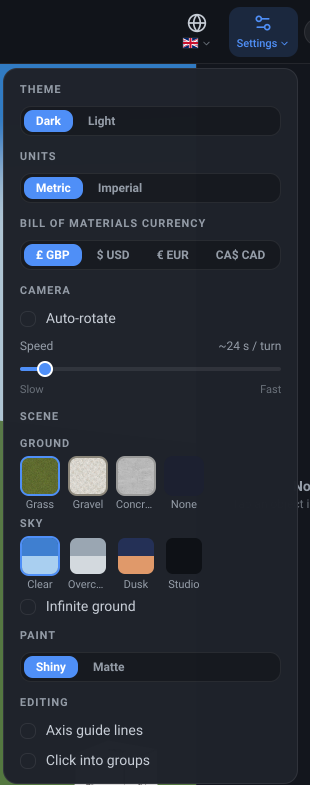
Settings
Section titled “Settings”What it is. A button at the right-hand end of the toolbar, next to the session timer and the account menu, which opens a dropdown of six sections.
What it does. Gathers, from the top:
| Section | What it sets | Written up in |
|---|---|---|
| Theme | The dark or light interface | Light and dark |
| Units | Metric or imperial measurements | Metric and imperial |
| Bill of Materials Currency | The symbol on every cost | Currency |
| Camera | Auto-rotate and its speed | The Visuals settings |
| Scene | The ground, the sky, the van’s paint finish | The Visuals settings |
| Editing | The axis guide lines drawn while you drag, and whether a click can select inside a group | The Visuals settings |
Language is not in this menu while the toolbar has room for the language globe beside it. On a window too narrow for the globe, Settings gains a Language row just under the currency, showing your current flag and language; pressing it opens the list of languages in place.
Options and limits. In the van editor this is the only place each of those settings lives - there is no second copy of any of them elsewhere in the editor. The demo explorer keeps its own theme, unit and currency controls and its own Visuals menu, and the custom-object editor its own unit switch, as Metric and imperial and Light and dark both note. On a narrow window there is no room for the button on the bar, and the whole menu moves into the More menu with its sections intact; on a phone or tablet layout it is always in that menu. The dropdown is inert during the interface tour, so a stray click cannot leave your restored design spinning.
Settings is deliberately not where the toggles you flip mid-build live. Undo and redo, the perspective and orthographic switch and the orbit and fly switch all stay on the bar as buttons, because a mode you change several times an hour is a different kind of thing from a preference you set once.
What it affects. Nothing about your design. Two of these choices are remembered between visits and the rest are not: see each control’s own page.
Related
Section titled “Related”- Toolbar overview - the whole bar, and what moves into More as the window narrows.
- Language - the globe beside this menu, which moves into it on a narrow window.
- Your account - the other menu at the right-hand end, for the account itself rather than for the app.
- The Visuals settings - the three sections at the foot of this menu, in full.