
Group states
A group state is a saved arrangement of one group’s members. The classic case is a bench that becomes a bed: same objects, two positions, and you want to look at both without rebuilding either.
States live on the top-level group, and every top-level group has an implicit Base - the arrangement you built. Each state you add is a set of differences from that base, recorded as you pose it.
A group nested inside another has no states of its own, deliberately: the parent’s state poses it, moving everything inside it together, so a cupboard’s “doors open” state belongs to the cupboard rather than to the door sub-group.
The state chips
Section titled “The state chips”What it is. The row of chips under a group’s header in the Object List: Base, then one per saved state.
What it does. Clicking a chip switches the group to that arrangement, and the 3D view re-poses immediately. Double-clicking a chip renames it.
Options and limits. The row is there for every top-level group, whether or not it is selected and whether or not it is expanded, so you can switch a group’s arrangement without selecting it first. A sub-group’s row has no chips, for the reason above. Base cannot be renamed - it is the absence of a state rather than one of them.
Names must be unique within the group, and new states are named State 1, State 2 and so on until
you rename them.
A state can record more than position: a member’s rotation, its dimensions, and whether it is hidden are all part of the arrangement. Hiding a sub-group hides everything inside it.
Switching any single group’s state clears the active van state, because the whole-van composition no longer matches what is on screen.
What it affects. How the group’s members are posed, which is a real change to the design and is saved with it. Switching between saved states does not lose anything - each state keeps its own poses.
Object state
Section titled “Object state”What it is. A row of chips under a single object’s row in the Object List, for the few catalogue components that ship in more than one form. A pop-top is the one to picture: Closed and Open.
What it does. Clicking a chip swaps which form is shown. The object keeps its size, its place and its name - only the shape changes.
Options and limits. These forms come with the component, so there is nothing to add, rename or delete: unlike a group state, you did not author them and the + Add pill is not offered. There is no Base chip either, because one of the forms is always showing.
Both forms share one size. Resizing the object while it is open resizes it closed as well, so a pop-top cannot end up wider raised than it is shut.
This is a single object rather than a group, so it needs no grouping and appears in the bill of materials once, weighing the same whichever form is on screen.
The chips are shown but inert in the read-only demo explorer, where they say which form the design holds without offering to change it.
What it affects. Which model is drawn, which is a real change to the design and is saved with it.
Add state
Section titled “Add state”What it is. The + Add pill at the end of a group’s chip row.
What it does. Creates a new state for that group and switches to it straight away, ready to pose.
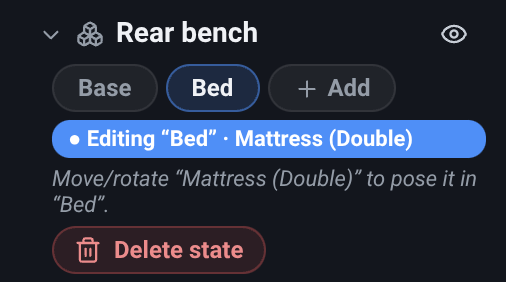
Options and limits. A new state starts empty, so nothing moves when you create one: the members sit where the base arrangement puts them until you pose them. Then move its members: with the state active, moving, rotating, resizing or hiding a member records into that state rather than into the group’s base arrangement.
While a state is active and the group (or one of its members) is selected, the panel shows an Editing “…” banner and the Inspector shows the same warning. It is worth trusting: it is the difference between posing a bed and moving it.
The pill is hidden in the read-only demo explorer, where states can be switched but not authored.
What it affects. Adds an empty state and activates it. Nothing moves until you move it.
Delete state
Section titled “Delete state”What it is. A red Delete state button, shown beneath the chips when a state is active and its group (or one of its members) is selected.
What it does. Removes the group’s currently-active state, and the group returns to Base.
Options and limits. It deletes the state that is active - there is no per-chip delete, so switch to the one you mean first. Base cannot be deleted.
If a van state mapped this group to the state you deleted, that mapping is dropped and the group falls back to Base there. As always, Undo brings the whole thing back.
What it affects. The group’s saved arrangements, and any van state that referred to this one.
Related
Section titled “Related”- Van states - posing every group at once.
- Groups - creating the group a state belongs to.
- Guide: Introduction to “States”.
- Tutorial: Group and arrange, in the app under Tutorials.