
Opening properties
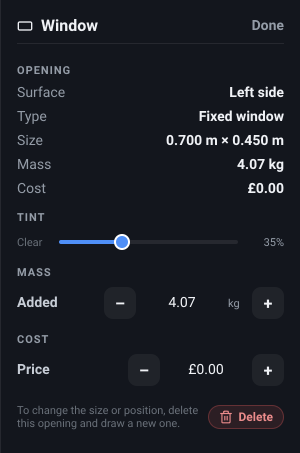
Select a finished opening - click it in the 3D view, or its row in the Object List - and the Inspector shows what it is and what it costs you:
- Surface - Left side, Right side, Roof or Rear doors.
- Type - Fixed window, Sliding window, Awning window or Blank opening.
- Size - width by height, in your unit setting.
- Mass and Cost - exactly the figures its bill of materials line carries.
There is no size or position control here, and that is deliberate. An opening’s shape is fixed once it is cut: to change it, delete it and draw a new one. There is no Duplicate button either - a copy would land on top of the original, which is not a valid placement - and an opening can never be a member of a group, so grouping a selection that includes one simply leaves it where it is. Delete is the only action in the footer. You can rename an opening by double-clicking its row in the Object List.
In the demo explorer the panel is the readouts alone - the tint slider, the weight and price fields and Delete are all absent, since you are looking at somebody else’s design.
When the surface is not being drawn - you have switched that wall or the roof off in the Van menu, or the opening is on the sliding door and the door is shown open
- the window is not drawn either. A faint outline is left on the van in its place, so you can still see where your openings are while you work with a wall hidden.
If the van no longer fits the opening, the panel says so at the top and tells you to delete it and draw a new one, and the Object List marks the row with an amber warning. This happens when a change to the van moves the surface out from under the aperture - resizing the van, or moving the wheelbase so an arch lands under a window. Such an opening is not drawn at all, and it is left out of the bill of materials and the weight totals, so what you see and what you are billed agree.
Glass tint
Section titled “Glass tint”What it is. A slider under Tint, labelled Clear at the left end with the percentage read out on the right.
What it does. Sets how dark the glass is, from 0% - clear, still visibly glass because it still reflects - to 100%, near black.
Options and limits. Glazed openings only. A Blank opening has no glass, so it has no Tint section at all. New windows start clear.
The whole drag is a single undo step: the glass follows the slider live, and the change is committed when you let go.
What it affects. How the glass is drawn. Tint has no effect on weight, price, or anything else measurable, and it is stored with your design.
Added weight
Section titled “Added weight”What it is. An editable - value + row under Mass, labelled Added, in kilograms or
pounds.
What it does. Sets what this opening contributes to your Added weight total. It starts as an estimate worked out from the aperture itself, and you type over it with your real window’s figure.
Options and limits. The estimate is roughly 10 kg per square metre of glass - one pane for a fixed or awning window, two for a sliding one - plus about 0.4 kg per metre of the aperture’s perimeter for the liner that bridges the shell. A Blank opening is the liner alone, which is why a roof hole reads as almost no added weight: the fan you put over it is a catalogue object and carries its own.
The steppers move 0.25 kg (or 0.25 lb) at a time and typing takes any figure; it cannot go below zero. Because the estimate is worked from the square-cornered rectangle, heavy corner rounding makes it very slightly high.
An overridden opening splits onto its own line in the bill of materials rather than being counted with identical ones, so your correction is always attributable.
The same field, pre-filled with the same estimate, is on the draw panel before you press Generate - so you can enter your window’s real weight as you cut it. Nothing is stored there unless you actually change the figure.
What it affects. The opening’s weight, on its bill-of-materials line and in your added-weight total.
What it is. The editable row under Cost, in your chosen currency.
What it does. Sets what this opening contributes to the running cost total.
Options and limits. It defaults to zero, for every type, because window prices vary too much to guess usefully - so an opening you have not priced adds weight to your build but nothing to your budget. The steppers move a whole unit at a time. Like the weight, it is also on the draw panel at creation time, and an overridden price splits the opening onto its own bill-of-materials line.
What it affects. Your running cost total.
What it is. A small Reset link beside the Mass or Cost row.
What it does. Drops your figure for that one field - the weight goes back to the estimate, the price back to zero.
Options and limits. It only appears once that field is actually overridden, so its presence is how you tell an estimate from a figure you entered. Weight and price are independent: resetting one leaves the other alone. Reset appears on the draw panel too, for a figure you changed before generating.
What it affects. That one figure, and whether the opening rejoins the shared bill-of-materials line.
Related
Section titled “Related”- Drawing an opening - the surfaces, the draw mode, and the type picker that decides the estimate.
- Bill of materials and weight - where these figures end up.