
Custom box van
A custom box van is the cab of a van VanCAD models with a box body of your own size built behind it - the way Luton vans, removals vans and most box-body conversions are made. The cab is the real one, traced from the vehicle like every van in the library; the box is whatever size you set.
You start one from the van picker and set it up on one screen. Afterwards, Edit Van Dimensions resizes the box in the same terms, names the van Custom box van with its cab underneath, and otherwise works as it does for any van - apart from the over-cab shelf gap, which a box van does not have.
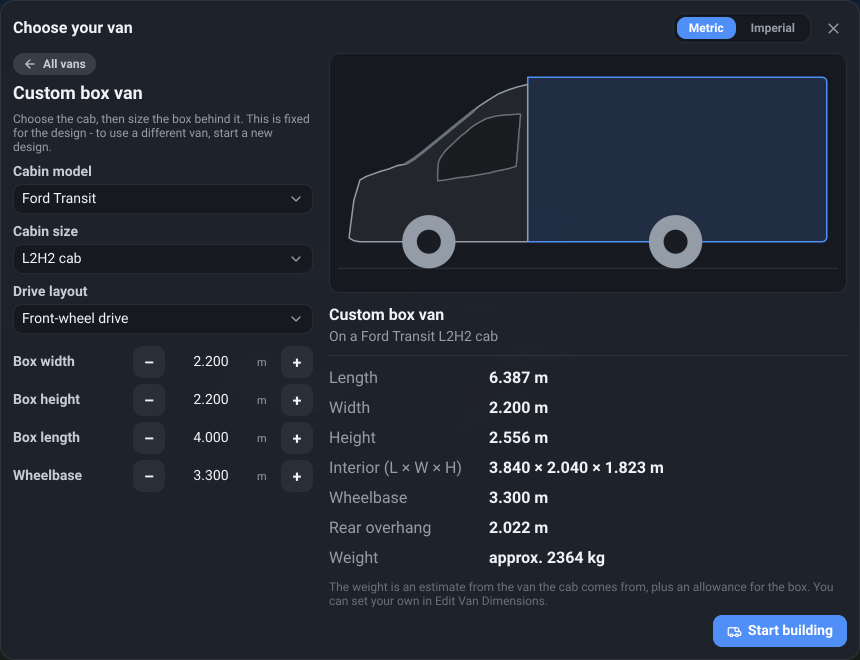
The Custom box van card
Section titled “The Custom box van card”What it is. The first card in the van picker, and the only one with a drawing on it. Searching the picker for box, Luton or chassis cab finds it; a make or model name does not, because it is not one model.
What it does. Opens the box van’s menu - the controls below - with a live preview beside it: a side drawing of the chosen cab with the box behind it and both wheels, then the overall length, width and height, the room inside the box, the wheelbase, the rear overhang and an approximate weight. On a phone the preview is a step of its own, reached with Preview. Start building begins the design.
Options and limits. It opens on a Ford Transit L2H2 cab with a box 2.2 m wide, 2.2 m tall and 4 m long. Use Change Van on a design that is already a box van and the card is marked Current van, and the menu opens on your own cab and box, so you can try another cab without starting again from the default. As with any van, Start building always begins a new design.
What it affects. Everything after it: the cab sets the front of the van, and the box is the space you build in.
Cabin model
Section titled “Cabin model”What it is. The van whose cab sits at the front of the box van.
What it does. Sets the cab’s shape and glazing, the front wheels, the cab seats and - with the drive layout - the height of the load floor. Choosing another model moves to that model’s first cab and resets the wheelbase to that van’s own.
Options and limits. Every model in the picker that VanCAD has traced, under the names the picker gives them. A Coming soon model is not offered: a box on a cab that has not been measured would be a guess at the front of your van.
What it affects. The cab, where the front axle sits and the starting weight. The box stays the size you set.
Cabin size
Section titled “Cabin size”What it is. Which of that model’s cabs to use.
What it does. Swaps the cab for another of the same model’s - some models have a taller cab on their high-roof versions - and the drawing changes with it. Like Cabin model, it resets the wheelbase to that cab’s van.
Options and limits. One entry for each cab VanCAD has measured, not one for each body: two bodies that share a cab are the same choice. Each entry is named after the first body it comes on (L2H2 cab), with the other bodies that share it listed underneath.
What it affects. The cab’s outline and height, and so the overall height wherever the cab stands taller than the box.
Drive layout
Section titled “Drive layout”What it is. Which wheels the cab’s van drives - front, rear or all four. It only appears where that cab is sold more than one way.
What it does. Chooses which version of the van the cab comes from. The cab looks the same, but a rear- or all-wheel-drive van’s load floor sits higher over its driveline - on a Ford Transit L2H2, about 100 mm higher - and the van weighs more.
Options and limits. The layouts that cab is sold with, starting on the first. Changing it keeps the box and the wheelbase as they are.
What it affects. The height of the floor inside the box, and so the headroom above it, and the starting base mass.
Box width
Section titled “Box width”What it is. The box’s outside width.
What it does. Widens or narrows the box. It can be wider than the cab, as most box bodies are: the front wheels stay the cab’s, and the rear wheels sit under the box.
Options and limits. Steps in 50 mm, or type an exact figure in whichever unit you are working in. It accepts 1.8 m to 2.6 m.
What it affects. The room across the box - which decides whether a bed can go across the van. The overall width is the box’s or the cab’s, whichever is wider.
Box height
Section titled “Box height”What it is. The box’s outside height, from the underside of the body to the top of the box.
What it does. Raises or lowers the box’s roof. Standing height inside is this less the load floor and your floor and roof build-up.
Options and limits. 50 mm steps; 1.6 m to 2.8 m.
What it affects. Headroom, and the overall height wherever the box stands taller than the cab.
Box length
Section titled “Box length”What it is. How far the box runs back from the cab, measured outside. The box starts right behind the cab.
What it does. Lengthens or shortens the box. In Edit Van Dimensions this row is the box’s own length, not the van’s overall length: the cab is added in front of it.
Options and limits. 50 mm steps; 2 m to 7 m.
What it affects. The length you have to build in, and the rear overhang behind the rear wheels.
Wheelbase
Section titled “Wheelbase”What it is. The distance between the front and rear axles.
What it does. Moves the rear wheels along the box. The front wheels belong to the cab and stay under it.
Options and limits. 50 mm steps. It starts at the wheelbase of the van the cab comes from, and choosing another cab resets it to that van’s. The longest it can be depends on the box’s length, because the rear wheels have to stay forward of the rear wall.
What it affects. Where the rear wheel arches come into the box, and the rear overhang.
Base mass
Section titled “Base mass”What it is. The empty box van’s kerb weight - a row in Edit Van Dimensions. The picker shows the same figure as its approximate weight.
What it does. Sets the starting point of the Laden total, as it does for any van.
Options and limits. Steps in 50 kg, or type the exact figure. On a box van it starts as an estimate: the weight of the van the cab comes from, plus an allowance for the box’s panels of about 6 kg for every square metre of box. VanCAD has no researched weights for box vans, so treat it as a placeholder - the figure on your own plate, or from a weighbridge, is the one to enter.
What it affects. The Laden total only. It is not part of Added weight, which is what your conversion adds.
Related
Section titled “Related”- Van dimensions - the rest of the panel, including the inner shell and the wheel arches.
- The Van menu - where Change Van and Edit Van Dimensions are.