
Van states
A van state is one click that poses the whole van: bed made up, table stowed, awning out. It does not store any positions of its own - it is a list of which group state each group should be in, which is why a van state is cheap to make once the groups have their arrangements.
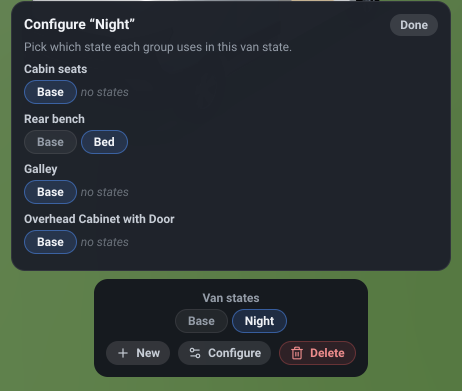
The van states
Section titled “The van states”What it is. On a computer, the Van States button in the view strip along the bottom of the 3D view, after the camera controls. It opens a menu upward from the strip holding Base and every saved van state as chips, with the + New · Configure · Delete actions under them. On a phone, the same chips and actions are at the top of the Objects sheet instead.
What it does. Saves and switches whole-van arrangements. The menu stays open while you switch, so you can flip between van states and watch the van change.
Options and limits. The button is always the same size - it does not show the name of the van state you are on, so the strip never shifts when you rename or switch. The lit chip in the menu is the one you are on. When the window is too narrow for the whole strip, the van states move into the strip’s More menu (after the zoom and field-of-view sliders, before Home), where they appear as the full list.
The van states are hidden unless there is at least one group - with nothing that can be posed, there is nothing to compose. In practice they are always there: every design starts with the cab seats as a group. Only top-level groups take part: a sub-group is posed by its parent’s state, not directly by a van state.
In the editor the action row is always shown, even when the actions are unavailable, so the menu never jumps around under the cursor. In the read-only demo explorer the row is absent rather than disabled, and the chips cannot be renamed - you can switch between a design’s saved van states, but not author them. The same goes for a design that has run out of time: you can still switch between its van states, but not change them.
What it affects. Which group state each group is in. Van states are part of the design and are saved with it.
The van state chips
Section titled “The van state chips”What it is. Base, then one chip per saved van state, in the Van States menu.
What it does. Clicking one applies it: every group named in it goes to its mapped state, and every group not named in it goes back to Base. That completeness is the point - switching to “Night” cannot leave a group behind in an arrangement you set an hour ago.
Options and limits. Double-click a chip to rename it (in the editor - the demo explorer’s chips switch but do not rename). Base is the implicit everything-in-base composition rather than a saved state, so it cannot be renamed or deleted.
Base is highlighted only when it is genuinely true - no van state active and every group actually in its base arrangement. Switch one group by hand and no chip is highlighted at all, which is accurate: what is on screen is not any of the saved compositions.
Applying a van state can take a moment on a large design, and the chip shows that it is working while the scene re-poses.
What it affects. Every group’s active state.
New van state
Section titled “New van state”What it is. The + New action, in the Van States menu.
What it does. Creates a new van state, named Van state 1, Van state 2 and so on, and makes it
the active one.
Options and limits. It starts empty, which means every group is left at Base until you say otherwise - so creating one does not capture the arrangement currently on screen. Open Configure to fill it in.
What it affects. Adds a van state. Nothing moves.
Configure
Section titled “Configure”What it is. The Configure action in the Van States menu, which closes the menu and opens a panel above the view strip listing every top-level group.
What it does. Lets you choose which of its saved states each group takes in the van state you are currently on.
Options and limits. It is disabled on Base - the all-groups-at-base composition is implicit, so there is nothing to configure. The van re-poses live as you pick, so the panel doubles as the way to see the composition you are building.
What it affects. The active van state’s mapping.
Group state, in Configure
Section titled “Group state, in Configure”What it is. One row of chips per group inside the Configure panel: Base, then that group’s own saved states.
What it does. Picks the state this group takes in the van state being configured.
Options and limits. A group left on Base is simply left out of the mapping, which is the same thing - unmapped groups are reset to base when the van state is applied.
A group with no saved states of its own still appears, offering only Base and marked no states. That is a prompt rather than a fault: give the group a state first, then come back.
Each chip you press is recorded as two steps - the mapping, then re-applying the composition - so undoing one takes two presses of Undo.
What it affects. One entry in the active van state’s mapping.
What it is. The Done button at the top of the Configure panel.
What it does. Closes the panel.
Options and limits. There is nothing to confirm or discard - every chip you pressed was applied when you pressed it, which is why the van re-posed as you went.
What it affects. Nothing. It closes a panel.
Delete van state
Section titled “Delete van state”What it is. The red Delete action, in the Van States menu.
What it does. Removes the van state you are currently on.
Options and limits. Disabled on Base, which cannot be deleted. Deleting a van state removes only the composition: every group keeps its own saved states, because those belong to the groups. Undo restores it.
What it affects. The document’s list of van states.
Related
Section titled “Related”- Group states - the arrangements a van state composes.
- Groups - what has to exist before any of this is offered.
- Guide: Introduction to “States”.